An automated system that keeps me organized and
never forgets anything.
Informational interviews have been critical to my career pivot — helping me gather information and expand my network. Every good conversation results in a lot of follow-up: leads to track down, contacts to stay in touch with, and advice to consolidate. The time and attention needed to keep up with this was distracting me from actually looking for a job.
Before
- I organize and rewrite my notes so they are coherent
- I save this into a Google Document, with date and contact info of the person I interviewed
- I go into my Notion database and create a contact record
- I draft a thank you note in Gmail
- I make a note to myself on follow up actions
- I hope that I remember to do all this
Now
- I drop the meeting transcript into a folder
- My tool writes summary and recommendations, updates contact database, drafts customized thank you notes, and sends me a reminder to follow up
- I focus on building my network and looking for work
The six outcomes
Summary written
Claude produces a structured summary, key recommendations, and action items from the raw transcript.
Logged to running doc
Notes are logged to a single info-interview doc, which feeds into NotebookLM as a RAG knowledge base.
Thank-you drafted
Customized email saved as a Gmail draft, highlighting some of the main takeaways. I review, edit and send.
Contacts database updated
Creates or updates contact record. Flags next date to reach out.
Action items captured
Pulled from the summary, posted as blocks on my "Info Interview Follow Up" page in Notion.
Self-nudge sent
Email lands in my inbox: "check the follow-up page, verify the contact record."

"The more tools I build, the more they begin to connect.
This automation feeds into my career pivot RAG knowledge base — all the intelligence I've collected that I can query to surface patterns and strategic insights."
Under the hood
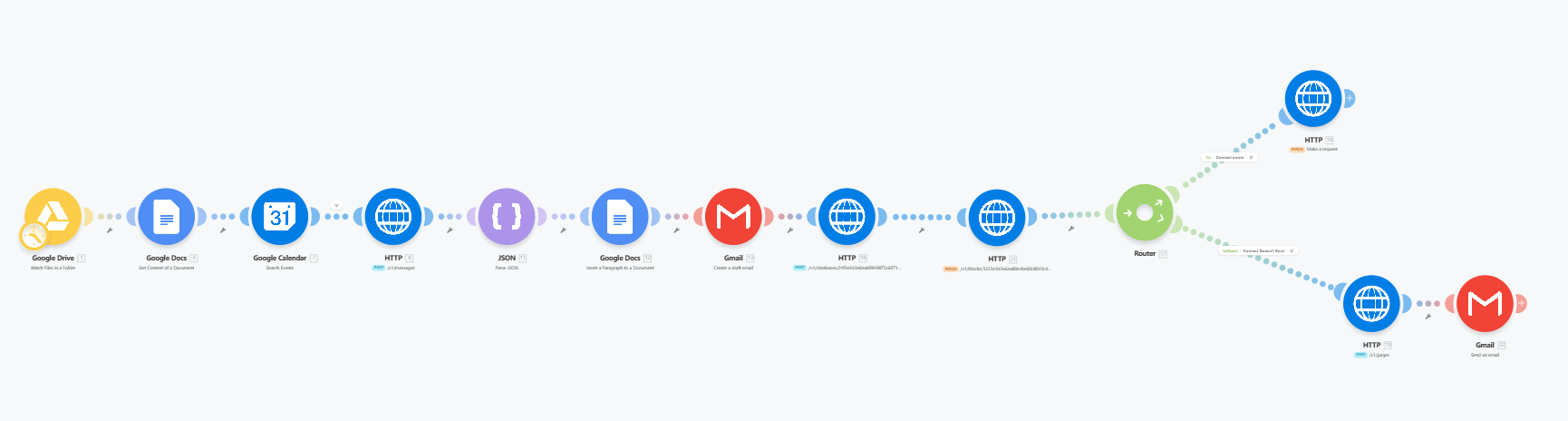
The whole thing runs in Make — twelve modules in four logical chunks. Here's each section, with what it actually does.
Trigger + capture
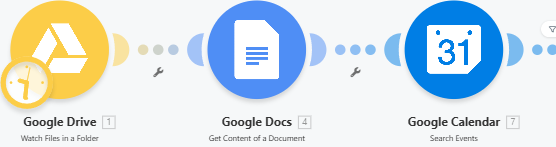
Make watches my dedicated Drive folder. When a transcript lands there, it pulls the doc's contents and looks up the matching Calendar event so it knows who I met with and when. The trigger is a single, deliberate manual action — moving the file — which keeps me in control of what gets processed.

Extract + process the conversation
An HTTP module POSTs the transcript to Anthropic's API with a structured prompt asking for a summary, key recommendations, and action items. The JSON module parses Claude's response into clean fields, then a Docs module appends a new section to my running info-interview log.
Draft the thank-you, prep notion
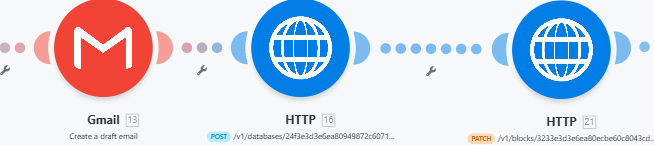
Gmail creates a customized thank-you draft citing real takeaways from the meeting — saved, not sent, so I can review. In parallel, two HTTP calls hit the Notion API: one to query the contacts database, one add items to my running "follow up actions" list.
Log the contact, send the reminder
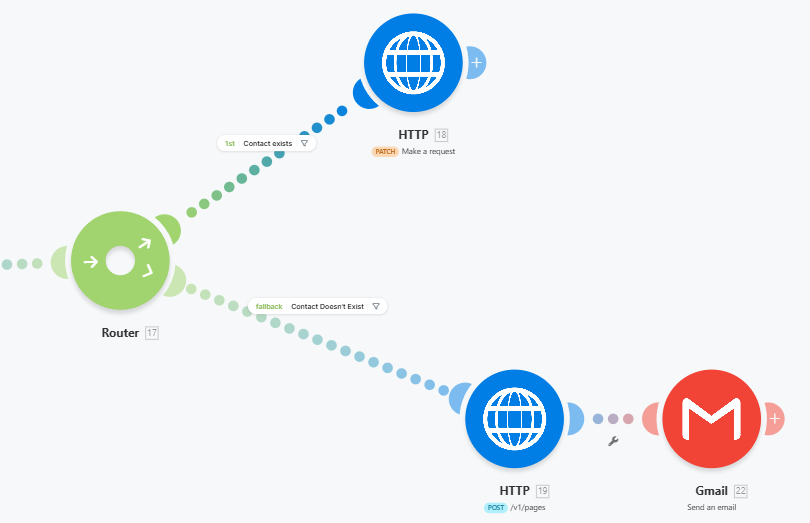
An HTTP call hits the Notion API to query the contacts database and determine if this is an existing contact. If yes: PATCH the existing record's "last contacted" date, which triggers my own reminder cadence. If no: POST a new page to the contacts database. Either way, the chain ends with a self-email nudging me to check the follow up action page.
The stack
Six APIs and 10 common tools - tied together to save me hours every week.